No Special Knowledge Prompt Start Try for Free

How to use a CRM system

Manage Clients Effectively: A Guide for Your Business
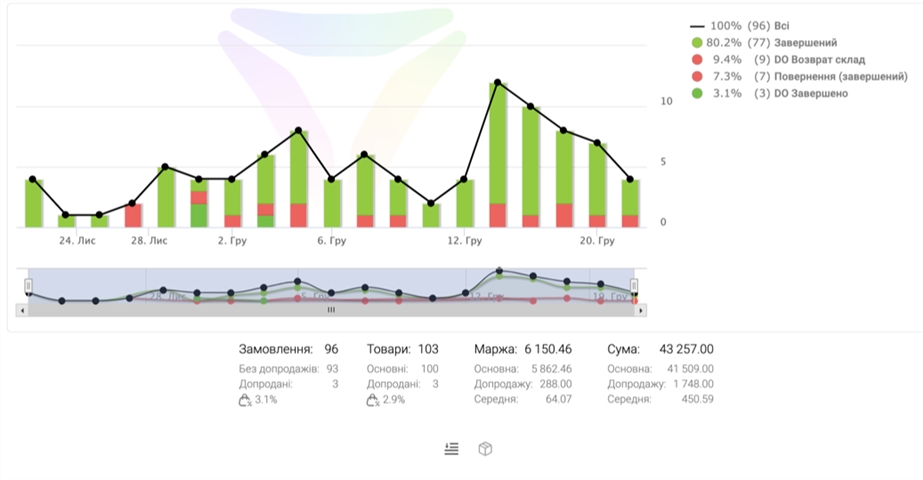
How to use a CRM system

Why Choose Us

Why Choose Us

Four Strengths

01 //
Data centralization
All customer and deal information in one place.
02 //
Improved communication
Ensures coordinated teamwork and awareness.
03 //
Increased sales
Helps manage customer interactions more effectively.
04 //
Efficient planning
Organize your work and track results.

What is the Result

What is the Result

Integration with courier services (Nova Poshta, Ukrposhta, Justin)
Modular structure with the ability to connect additional functions
Commercial proposal generation
Online version with mobile device adaptation
Unlimited cloud data storage
How to Use a CRM System: A Complete Guide

For Sales Managers

For Sales Managers

How to Use a CRM System: A Complete Guide
For sales managers
We will provide tools for complete control over all stages of customer work, analytics, and strategic decision-making.
For business leaders
We will provide tools for complete control over all stages of customer work, analytics, and strategic decision-making.
For support staff
Make customer service faster and better, having all the necessary information at your fingertips.
For marketers
Create targeted campaigns, track their effectiveness, and improve interaction with potential clients.
For small businesses
A simple and powerful solution for organizing work with your customer base, increasing loyalty, and growing sales.

Register

Register →

Capabilities Demonstration

Capabilities Demonstration

Capabilities Demonstration

Client Testimonials

Client Testimonials

System Review 1
System Review 2

faq

FAQ

What is LP-CRM?

LP-CRM is a Ukrainian CRM for business management that helps optimize work with clients and sales.

How to add a new client?

Select Contacts, click Add, and fill in the required fields: name, phone, email.

Where to find interaction history?

In the client or deal card, go to the History tab to see all calls, emails, and tasks.

How to create a deal?

In the Deals section, click Create, select the client, describe the product/service, and specify the amount.

Where to view sales statistics?

Go to the Reports section, where you will find analytics on sales, manager activity, and other metrics.

Register →